

- Manual audits are roughly 90% data collection, 10% strategy
- Automation eliminates clerical tasks; human judgment still required
- Faster audits enable monthly cadence instead of quarterly rationing
- Juniors shift from spreadsheet data entry to strategic analysis
- Automated output is a starting point, never a final answer
The last time I ran a content audit fully by hand, it was a Sunday. A B2B SaaS client had a quarterly strategy call on Tuesday, roughly 40-something pages needed reviewing, and I had a spreadsheet, four browser windows, and a large coffee. I told myself it would take three hours. It took most of the day.
Here’s the thing nobody in this industry likes to admit: the content audit is essential, and we procrastinate on it anyway. Not because we don’t understand its value — because the repetitive part is soul-draining. So this is a straight retrospective. What my old SEO content audit workflow actually looked like, what changed when I stopped doing the clerical parts by hand, and — the part that surprised me — what didn’t change at all.
What My Manual Content Audit Workflow Actually Looked Like
The old process was 90% data collection and about 10% actual thinking, and I had the ratio backwards for years.
Page by page, the on-page audit process went like this: open the URL, copy the title tag into column B, count the characters, copy the meta description, note whether it was truncating. Then check the header hierarchy — is there one H1, do the H2s and H3s nest logically, or did a developer wrap a CTA in an H2 three years ago? Then eyeball keyword usage and rough keyword density, jot the word count, check the last-modified date for freshness. Then repeat. Forty times.
Here’s the order I worked in, and how little of it was actually strategy:
- Pull the title tag and meta description, count characters against the pixel limits.
- Validate header tag hierarchy — one H1, logical H2/H3 nesting.
- Flag keyword usage and rough density against the target term.
- Record word count and last-updated date for content freshness.
- Note internal links in and out of the page.
- Then, finally, make a judgment call: keep, rewrite, merge, or kill.
Only step six needed me. Steps one through five needed a warm body with a spreadsheet.
The deliverable was usually a 12-page document — technical on-page findings, keyword gaps, structural issues, and a prioritized recommendations section at the back. When I finally broke it down honestly, roughly eleven of those pages were transcription and formatting. The single page that justified my rate was the recommendations.
This isn’t a me problem. It’s a documented, industry-wide bottleneck. One audit-tooling analysis put it bluntly: manual audits are brutally time-consuming, and a thorough technical audit for a single site can take a full day or more. Scale that across a client roster and, as that same source notes, auditing becomes a bottleneck where your most experienced people spend their time checking files instead of doing strategic work. For large sites it’s worse — Gryffin’s guide notes that a manual content audit can take weeks or even months to complete, especially for sites with thousands of pages.
Here’s how the 12 pages actually broke down once I was honest about it:
| Audit component | What it required | Clerical or judgment? |
|---|---|---|
| Title tags & meta descriptions | Copy, paste, count characters | Clerical |
| Header hierarchy check | Read structure, flag broken nesting | Clerical |
| Keyword density / usage | Tally occurrences vs. target term | Clerical |
| Word count & freshness | Record numbers and dates | Clerical |
| Intent & cannibalization calls | Compare pages, read for meaning | Judgment |
| Prioritized recommendations | Tie fixes to business goals | Judgment |
How Does an Automated SEO Audit Change the Process?
An automated SEO audit changes the process by collapsing the entire data-collection layer into a single pass, so you arrive at the judgment calls almost immediately instead of hours later.
When I pointed a tool at the same site, the eleven clerical pages assembled themselves while I was still reading the first result.
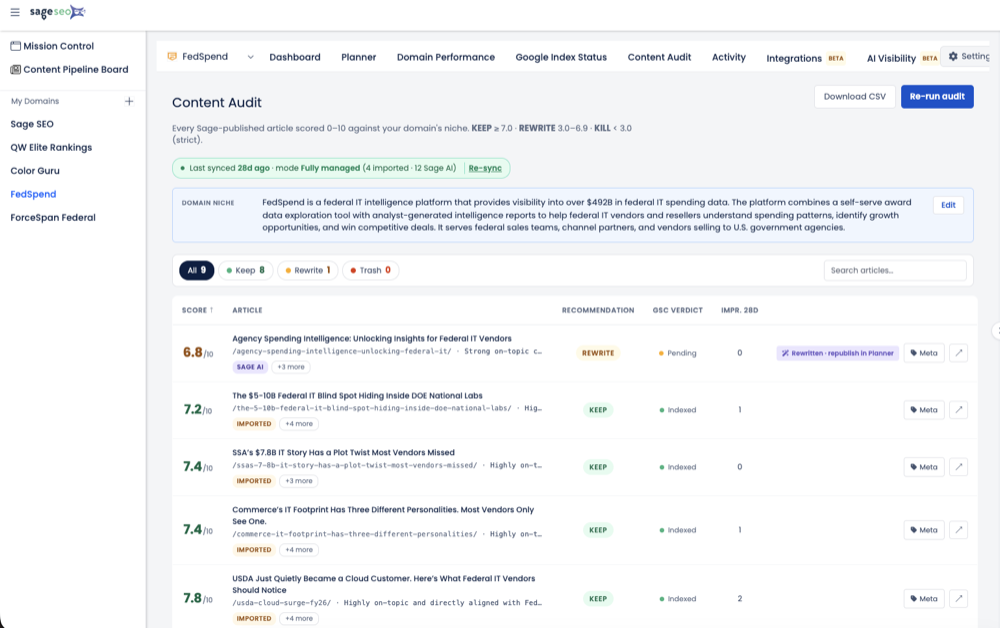
I ran the identical client site through Sage SEO’s content audit in one consolidated pass. It surfaced the title tag problems — the duplicates, the ones running long — the header structure issues, and the keyword usage patterns across every URL at once. No tab-switching. No character-counting. No context-switching tax, which is the part of manual auditing that quietly wrecks your afternoon: every time you jump from page 12 back to the spreadsheet, you lose your place and your train of thought.
I want to be careful here, because this is where vendor blogs start inventing numbers. I’m not going to quote you a percentage or a minute count. I didn’t run a stopwatch, and Sage has no first-party benchmark I can hand you. What I can tell you qualitatively is this: the part of the audit that used to eat a chunk of a working day happened in roughly the time it takes to get a coffee. That’s an observation, not a controlled study — treat it as one.
The more important shift was the shape of the output. Instead of a raw data dump I had to interpret, I got something closer to a prioritized list of on-page issues — a starting point for decisions rather than a pile of numbers I still had to sort. That distinction matters more than the speed, and I’ll come back to it. It’s the same reframe I hit when I stopped hand-editing metadata and moved to rewriting meta titles at scale: the tool doesn’t decide, it just clears the runway.
What Got Automated Away — And What Still Needs a Human
Automation removed the clerical layer of the content audit. It did not touch the strategic one — and that’s the whole point.
The tasks that vanished were exactly the ones I’d been dreading. Pulling and checking title tag optimization issues like length and duplication. Validating header tag hierarchy. Flagging keyword density and usage. Surfacing the obvious content gaps. All of it — the transcription, the counting, the formatting — gone.
What stayed on my plate was everything that actually required a strategist:
Skip the spreadsheets. Start Sage SEO free.
See how AI content ops transform your agency workflow in minutes.
- Judging whether a page still matches its target search intent, or whether the SERP moved on without it.
- Deciding which pages to consolidate, merge, or kill outright.
- Reading the competitive context — what’s ranking now and why.
- Prioritizing fixes against the client’s actual business goals, not a health score.
- Assessing tone and writing quality, which no density metric captures.
A good content audit checklist still applies in full — the difference is that the top half of it now executes itself. The established frameworks separate the two layers cleanly. As one content audit reference lays out, quantitative analysis covers measurable metrics like impressions, CTR and rankings, while qualitative analysis judges clarity, relevance, freshness, E-E-A-T, and heading and keyword use. The quantitative half is what tooling eats. The qualitative half is still you.
Here’s the split as I now think about it:
| Audit task | Automated in one pass | Still needs a strategist |
|---|---|---|
| Title / meta length & duplication | Yes | — |
| Header hierarchy validation | Yes | — |
| Keyword usage & density flags | Yes | — |
| Content gap surfacing | Partial | Which gaps matter |
| Intent alignment | — | Yes |
| Consolidate / kill decisions | — | Yes |
| Business-goal prioritization | — | Yes |
If you take one idea from this piece, make it that column split. The machine detects. You decide.
What Faster Audits Actually Change for a Team
The biggest change isn’t speed on a single audit — it’s cadence, staffing, and what you can afford to check.
When an audit stops costing a full day, you stop rationing it. My audits used to be quarterly events because that’s all the calendar would bear. Now the same work can happen monthly, or ad hoc when a section of the site starts slipping. That matters more than ever, because content decays and the SERP keeps moving — one 2026 analysis citing Ahrefs notes that page-two results capture very few clicks on average, roughly 0.78%. Catching a slide from position 8 to 14 in month one instead of month four is the difference between a refresh and a rescue.
Who Owns the Audit Now
The person who used to own the data-pulling — often a junior — gets handed back to interpretation work instead. That’s a better job and a faster path to becoming an actual strategist. I’ve watched a junior analyst go from “spreadsheet monkey” to leading refresh recommendations in a quarter, purely because the busywork stopped eating their week.
It changes client economics too. Faster turnaround means audits can be scoped and priced differently — as a recurring signal rather than a once-a-year deliverable. That’s the same closed-loop logic behind turning an underperforming page into a ranking one in an afternoon: shorten the loop, and the whole engagement changes shape.
| Dimension | Manual workflow | Automation-assisted workflow |
|---|---|---|
| Audit cadence | Quarterly, if that | Monthly or on-demand |
| Junior’s role | Data collection | Interpretation & refreshes |
| Client turnaround | Days | Same-session start |
| Main risk | Never getting done | Rubber-stamping output |
One caution, and I mean it. Faster does not mean skip the review. The failure mode I now watch for is treating the automated list as a final answer instead of a first draft. I’ve caught teams shipping “fix” recommendations the tool flagged that were flat wrong for the page’s intent. The output is a starting line, not a finish line.
Should You Automate Your Own Content Audit Workflow?
If most of your audit time goes into copying data rather than making decisions, that’s the exact part worth automating — and nothing else.
Do the gut-check I wish I’d done years earlier: look at your last audit and mark every step as clerical or judgment. If the clerical half dominates, you’re paying strategist attention for transcription work.
Don’t switch cold turkey. Run one page or one small site through an on-page SEO audit tool alongside your existing process and compare the outputs directly. Trust it when it earns trust. The reframe that stuck with me: the audit didn’t get “faster.” Eleven pages of clerical work disappeared, and the one page that needed a strategist stayed exactly where it was.
Common Questions About Content Audit Workflows
How long does a content audit take?
A manual content audit ranges from a full day for a small site to weeks or months for large ones. Industry guides confirm the largest sites can take weeks or even months to complete, which is why the data-collection layer is the first thing worth automating.
What’s the difference between a manual and automated SEO audit?
A manual audit means pulling title tags, headers, and keyword data page by page yourself; an automated audit surfaces those same signals in one pass. The judgment calls — intent, consolidation, prioritization — remain human in both.
Does automating an audit mean losing control or nuance?
No — automation removes the clerical layer, not the strategic one. You still decide what to keep, rewrite, merge, or kill; the tool just stops making you count characters first.
What should still be on my content audit checklist?
Keep every qualitative check: search intent alignment, cannibalization, competitive context, writing quality, and business-goal prioritization. Those don’t automate — they just get reached faster once the data collection is handled.
The Busywork Died, the Strategist Didn’t
I spent years thinking the content audit was hard. It wasn’t. It was tedious, and I’d confused the two. Strip out the transcription and what’s left is the part I actually trained for — the reading, the calls, the prioritization that no tool will make for you.
So here’s my plain opinion: if you’re still hand-counting title tag characters in a spreadsheet in 2026, you’re not protecting your craft — you’re hiding from it behind clerical work. Automate the eleven pages. Then go be worth the twelfth.