

- Semrush bundles on-page tools with many rarely used features
- Sage SEO focuses solely on scoring and fixing individual pages
- Unused suite modules inflate the true per-feature cost significantly
- Full suites best serve agencies running SEO, PPC, and link-building together
- Match your tool to your actual weekly workflow, not future possibilities
An agency I consulted for two years ago was paying $249.95 a month for a Semrush Guru plan and using exactly one screen inside it: the On-Page SEO Checker. Everything else — rank tracking across forty keywords nobody looked at, a backlink audit dashboard the account manager opened maybe twice a quarter, PPC keyword data for campaigns the client didn’t run — sat there unused. When I asked why they kept paying for the whole suite, the answer was “because that’s how you get the on-page tool.” That’s the exact trap this article is about, and it’s more common than most SEO consultants will admit out loud.
If you’re weighing a Semrush subscription against something narrower, the honest answer isn’t “Semrush is bloated” or “lightweight tools are always better.” It’s more specific than that, and it depends entirely on what job you’re actually hiring the software to do.
The Real Question Isn’t Which Tool Is Better — It’s Which Job You’re Hiring It For
Feature count doesn’t equal fit, and on-page SEO is the clearest place I’ve seen that play out. Semrush is built as an all-in-one marketing suite — SEO, PPC, content marketing, competitive research, social — and the On-Page SEO Checker is one module living inside that much larger structure. Sage SEO occupies a narrower lane: scoring and fixing a page’s on-page fundamentals, then helping you act on that score. The overlap between the two tools exists in a thin slice of what Semrush offers and almost all of what Sage SEO offers.
Here’s a quick way to see the mismatch before we go section by section:
| Tool | Primary Job It’s Built For | What Comes Bundled In |
|---|---|---|
| Semrush (full suite) | Competitive intelligence across SEO, PPC, and content at scale | Rank tracking, backlink audits, keyword database, PPC research, On-Page SEO Checker, content tools |
| Sage SEO | Scoring and shipping optimized on-page content | On-page scoring, AI-assisted drafting, publish scheduling, outcome tracking |
I’ve watched this mismatch cost small teams real money, and you’ll hit the same wall if you shop for SEO software by feature count instead of by the task sitting in front of you today. A rank-tracking dashboard you never open doesn’t make your landing page rank better. It just makes your invoice bigger.
What Does Semrush’s On-Page SEO Checker Actually Do?
Semrush’s On-Page SEO Checker pulls content ideas, technical fixes, and competitor benchmarking straight from the same SERP and keyword database that powers the rest of the platform. You give it a target keyword and a URL, and it returns a prioritized list of recommendations: semantically related terms to add, backlink opportunities, structural suggestions, and strategy ideas benchmarked against the pages currently ranking for that term, according to Semrush’s own feature documentation.
That benchmarking against real ranking pages is genuinely useful, and it’s worth saying plainly: this isn’t a weak feature. The critique I’d make isn’t about quality. It’s about context — where the feature lives and what you have to buy to reach it.
Where the strength comes from — and what it costs
The checker’s power comes from Semrush’s massive keyword and domain database, the same infrastructure behind its rank tracker and competitive research tools. That’s a strength when you need competitor-level SERP data. It’s also why the feature can’t be unbundled and sold on its own — it’s structurally tied to the rest of the suite. Reviewers on G2 consistently note that Semrush’s depth comes with a real learning curve, especially for users who only need one corner of the platform.
If your on-page fundamentals — titles, headers, keyword placement, readability — are already solid and you mainly want fresh angle ideas from what’s ranking, this is a legitimate reason to reach for Semrush. It’s a case I’ll come back to later, because it’s the strongest one Semrush has.
What Are You Actually Paying For When You Buy Semrush?
Access to the On-Page SEO Checker isn’t sold separately — it comes bundled with rank tracking, site audit, backlink analytics, and PPC keyword research inside Semrush’s tiered plans. Semrush structures its pricing across ascending tiers, each unlocking more of the suite, and the exact current rates are best confirmed directly on Semrush’s pricing page, since plan structures and dollar figures shift over time and I’d rather send you to the source than quote a number that’s stale by the time you read this.
What matters for this decision isn’t the exact price point — it’s the ratio. You’re not buying “on-page checking.” You’re buying a bundle where on-page checking is one line item among many.
| What’s In the Bundle | Do You Use It Weekly? | Cost-Per-Use If You Don’t |
|---|---|---|
| Rank tracking across dozens of keywords | Only if you manage competitive rankings at scale | High — full plan cost, near-zero usage |
| Backlink audit and analytics | Only for link-building or disavow work | High if you outsource this |
| PPC keyword research | Only if you run paid search | High if you have no paid campaigns |
| On-Page SEO Checker | Yes, for most content-focused teams | Low — the module you actually open |
Run that math on your own account. This is basically the audit I did for that agency client — I tallied which dashboards had login activity in the last 30 days, and it wasn’t close. If four of five modules go unused, the effective cost of the one you touch every week is a lot higher than the sticker price suggests. I’ve made the same case in a deeper breakdown of how tool spend should follow real usage data, not assumptions about what you might need someday.
Skip the spreadsheets. Start Sage SEO free.
See how AI content ops transform your agency workflow in minutes.
Where Sage SEO Fits: A Single-Purpose Tool for a Single-Purpose Problem
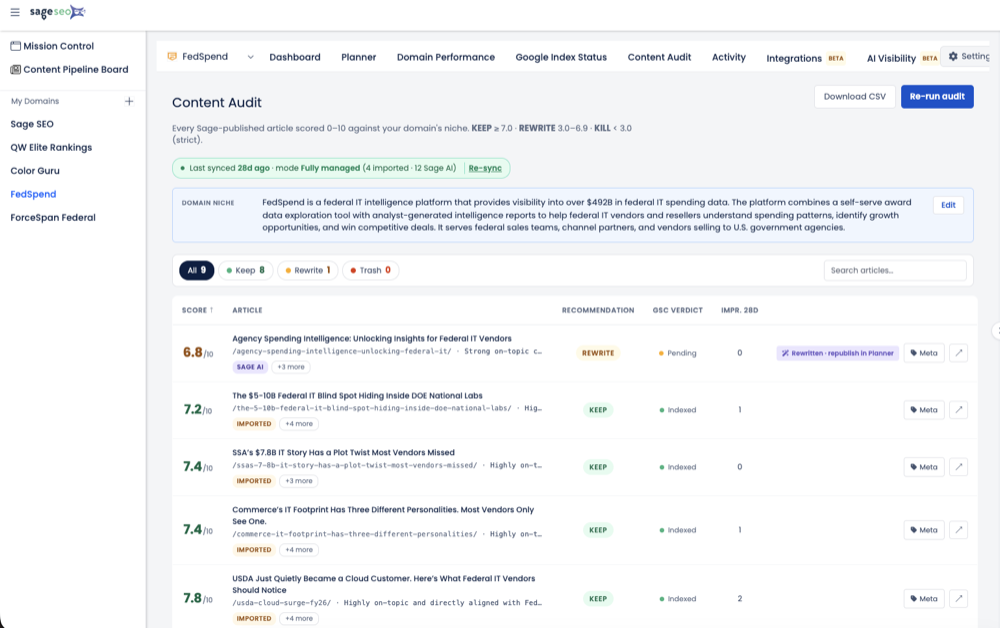
Sage SEO scores a page’s on-page fundamentals — titles, headers, content structure, keyword usage, readability — without asking you to navigate modules you don’t need. There’s no PPC tab. No backlink index. No rank-tracking dashboard demanding weekly attention. You land on the score, see what’s weak, and move.
That simplicity isn’t a limitation — for a specific reader, it’s the entire point. If you already know your target keyword and just need to know whether a page is optimized for it, you don’t need a competitive intelligence platform. You need an answer, fast.
The workflow this actually supports
I fixed a client’s stale landing page a few years back that had sat at position 14 for five months with genuinely good copy — the problem was buried in header structure and thin keyword coverage, not writing quality, a story I wrote up in more detail in a piece on fixing an underperforming page in a single afternoon. That’s the exact use case a scoring-first tool serves well: you’re not researching a market, you’re diagnosing one page. Sage SEO’s content audit workflow is built around exactly that loop — score, fix, ship, check attribution — rather than a dashboard you’re expected to explore.
Compare that to opening Semrush’s On-Page Checker, where the same recommendation might sit a few clicks past a rank-tracking summary and a backlink alert you have to dismiss first. Neither path is wrong. One just has more friction for a narrow task.
Semrush On-Page SEO Checker vs Sage SEO: A Side-by-Side Look
The two tools diverge most sharply on scope, learning curve, and speed to an actionable answer — not on the accuracy of their on-page recommendations. Both will tell you a page is missing header coverage on your target keyword. How fast you get there, and what you have to wade through, is where they separate.
| Dimension | Semrush On-Page SEO Checker | Sage SEO |
|---|---|---|
| Scope | One module inside a full SEO/PPC/content suite | Purpose-built for on-page scoring and content ops |
| Learning curve | Steeper — tied to the broader platform’s navigation | Shallow — score and fix in one pass |
| Pricing structure | Bundled into tiered suite plans | Scoped to plans built around content and on-page work |
| Ideal user | Teams already using Semrush for rank tracking or PPC | Teams whose job is fixing and publishing pages |
| Speed to insight | Fast once you know the interface | Fast from the first login |
To be fair to Semrush: when you genuinely need competitor SERP analysis alongside on-page recommendations — say, you’re deciding whether to target a keyword at all based on who currently ranks — its bundled keyword database adds real value that a standalone scoring tool doesn’t attempt to replicate. I’ve relied on that kind of competitive context myself, and it’s the strongest argument for staying in the Semrush ecosystem if you’re already there for other reasons.
Who Actually Needs the Whole Suite?
Agencies running full-funnel SEO and PPC for multiple clients, teams doing heavy backlink or competitive research, and content teams needing keyword-gap analysis at scale are the clearest fits for Semrush’s full price tag. If your day involves disavow files, share-of-voice tracking, and paid search keyword lists in the same week, the bundle earns its cost because you’re using most of it.
- Multi-client agencies managing rank tracking and reporting across dozens of accounts
- Link-building or digital PR teams that need ongoing backlink audits and disavow workflows
- Paid + organic hybrid teams pulling PPC keyword data alongside SEO research
- Enterprise content teams running keyword-gap analysis against several competitors at once
Contrast that with solo marketers, small business owners, and freelance SEOs managing on-page work for a handful of clients. Their actual question most days is narrower: “is this page optimized, and what do I fix first?” That’s a Sage SEO question, not a rank-tracking question. If you’ve ever pulled data manually from Search Console just to answer that, you already know how much faster it is when the score and the fix live in the same place.
How Do I Decide Between a Full Suite and a Lightweight On-Page Tool?
Ask what you actually do every week, not what you might need someday — the tool should follow your workflow, never the other way around. I’ve watched teams buy the bigger platform “to grow into it” and still be using one-fifth of it a year later.
- Do I run backlink audits or disavow work regularly? If not, that module in Semrush is dead weight on your invoice.
- Am I managing PPC campaigns alongside SEO? If yes, the bundled keyword research has real crossover value.
- Do I need rank tracking across dozens of keywords and competitors? That’s a suite-level need, not an on-page one.
- Or do I just need to know if this specific page is optimized and what to fix first? That’s the job a focused scoring tool was built for.
If you answered “no” to the first three and “yes” to the fourth, you’re the reader this article was written for. I’d rather see a solo operator spend on a tool they open every day than a suite they open once a month out of guilt. That preference isn’t universal — an agency juggling backlink profiles for fifteen clients genuinely needs the bigger machine, and I’d tell them so directly rather than pretend one tool fits every desk. The same logic applies to plugin overlap, which I’ve written about before in the context of whether you still need a WordPress SEO plugin once you have an optimization platform — the answer is almost always “it depends on what you’re actually doing on Tuesday morning,” not on which tool has more logos on its features page.
Buy the Job, Not the Logo
I’ve stopped recommending tools based on how many features they list and started recommending them based on what a client actually opens on a Tuesday. That shift changed more accounts than any single tactic I’ve tried in twelve years of doing this. Semrush earns its price for teams running competitive intelligence, backlink work, and paid search in the same breath as their SEO. For everyone else — the freelancer, the small business owner, the content team whose real question is “is this page ready to publish” — paying suite prices for one module is a decision you’ll quietly regret every renewal notice. Fit the tool to the job, and the rest of the decision makes itself.